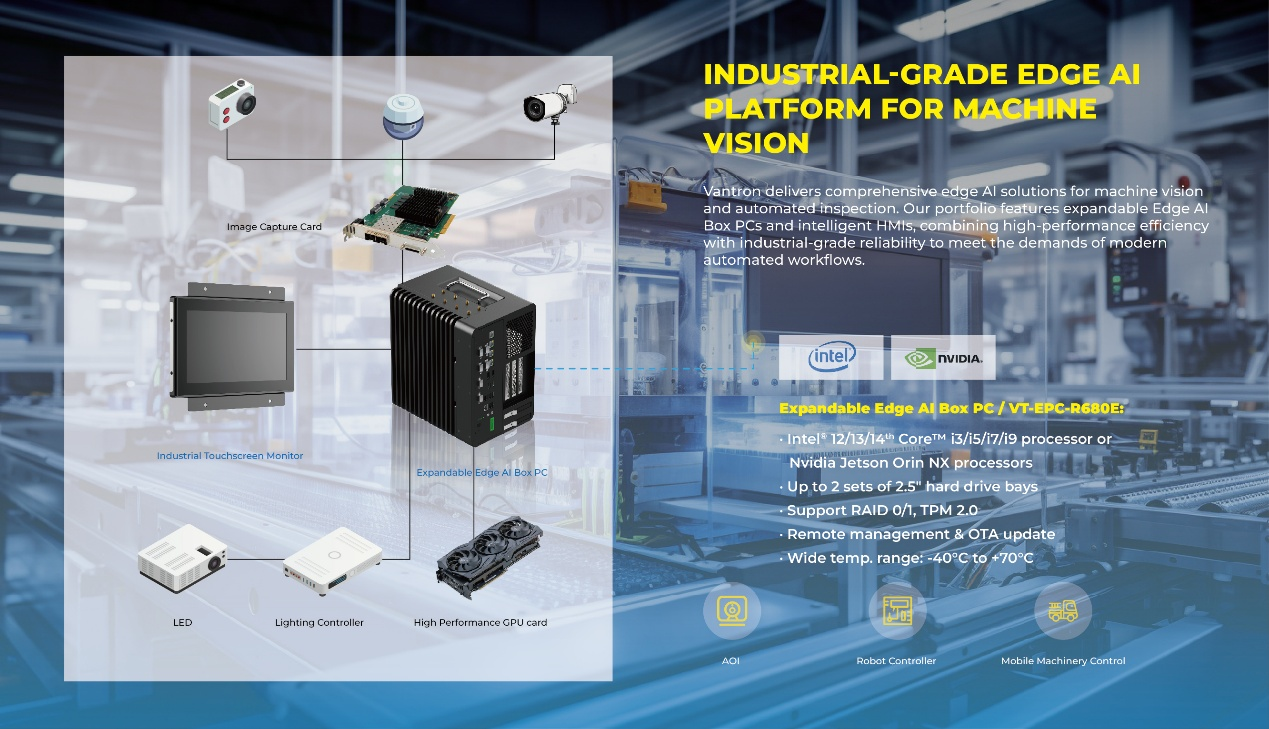
Machine vision is increasingly important for automated quality control, from detecting surface defects to verifying assembly and tracking products. Yet camera resolution and AI models are only part of a reliable inspection system. The computer must handle image streams, connect with industrial equipment, and operate within factory temperature and power limits. Choosing the right edge platform helps OEMs build inspection equipment that is dependable and easier to maintain.
Why the Computing Platform Matters
A vision station may acquire images, preprocess frames, run inference, communicate with a programmable logic controller (PLC), and report results to a manufacturing execution system. These tasks compete for CPU, memory, storage, and network bandwidth. If processing falls behind image capture, defects may be missed or the production line may slow down.
A suitable rugged box pc combines computing and industrial connectivity in one platform. Engineers should evaluate camera count, image size, inspection speed, model complexity, and data-retention needs. This is more useful than comparing processor names alone.
Plan Network Capacity for Multi-Camera Inspection
Camera connectivity can become a bottleneck in high-throughput systems. Several cameras may stream large images simultaneously, while the computer exchanges status data with controllers and higher-level software. Network design should account for peak traffic, switch capacity, and whether cameras receive power over Ethernet.
The EPC-R680E Expandable Vision AI Box PC has one Gigabit Ethernet port and four 2.5GbE ports with PoE+ support. This can simplify connections to compatible industrial cameras and sensors. Integrators should check camera bandwidth, PoE power requirements, and network configuration before deployment. They should also verify that network interfaces and application software can sustain the required throughput without unnecessary latency.
Match Compute and Expansion to the AI Workload
Not every inspection task needs a discrete GPU. A basic rule-based application may run adequately on a CPU, while high-resolution classification, object detection, or multiple inference streams can require acceleration. Expansion options let OEMs match hardware to the workload instead of overprovisioning every unit.
The EPC-R680E supports 12th, 13th, and 14th Gen Intel® Core™ desktop processors, two DDR5 SO-DIMM sockets for up to 96GB of memory, and a PCIe 5.0 x16 slot for supported mainstream GPUs. Additional PCIe and M.2 options provide flexibility for storage and wireless modules. Before choosing a configuration, validate GPU dimensions and power, thermal headroom, driver compatibility, inference framework support, and performance with production images.
For industrial automation machine vision OEMs, the key is to match computing resources with actual inspection requirements. A high-speed production line may need GPU acceleration and substantial memory, while a simpler inspection station may prioritize stable I/O and easy integration. Benchmarking with representative images helps determine the right balance between processing speed, system cost, and upgrading flexibility.
Checking Industrial I/O and Software Compatibility
Machine vision rarely works alone. A station may include PLCs, encoders, sensors, lighting controllers, actuators, and operator displays. Integrators should map each device to an interface and confirm signal levels, isolation, protocols, and drivers early in the design.
The EPC-R680E includes USB 3.2 ports, isolated RS232/485/422 serial interfaces, isolated CAN, digital inputs and outputs, and support for up to four independent displays through HDMI and DisplayPort. These interfaces may reduce extra conversion hardware, depending on the system. The listed operating systems are Windows 10/11 IoT, with Linux available upon request. Verify OS images, camera SDKs, GPU libraries, PLC drivers, and update procedures as one integrated system.
For teams evaluating Vantron hardware, a bench test with the intended cameras, PLCs, and software stack can reveal protocol gaps, driver dependencies, and timing issues before installation. Test normal production cycles, peak throughput, and brief communication interruptions; then confirm that alarms and inspection records remain consistent after recovery.
Design for Temperature, Power, and Maintenance
Factory environments expose computers to conditions that office PCs may not tolerate. Units can sit near machinery, face changing ambient temperatures, or draw power from industrial DC supplies. A finless design reduces moving parts and avoids pulling air through a fan, but thermal layout still matters. Consider cabinet airflow, mounting orientation, nearby heat sources, and sustained workloads.
The EPC-R680E operates from -40°C to 70°C with 35W TDP CPUs, or -40°C to 55°C with 65W TDP CPUs. It supports 9V–60V DC input and has an IP50-rated enclosure. IP50 does not provide water protection, so washdown areas or locations exposed to liquid need additional safeguards. Confirm CPU temperature limits, supply voltage under load, grounding, and surge protection before installation.
Consider Reliability Across the Equipment Lifecycle
Industrial vision products are often part of machines expected to operate for years. Component availability, consistent imaging, remote diagnosis, and repeatable manufacturing can matter as much as benchmark performance. OEMs should ask suppliers about lifecycle planning, revision control, firmware updates, documentation, and technical support. Define how logs, failed images, and model versions will be collected when a result needs investigation.
Lifecycle evaluation should cover the entire deployed system: computer, cameras, lighting, application software, networking, and service access. Watchdog support, hardware monitoring, Wake-on-LAN, and PXE boot can assist maintenance workflows, but do not replace a tested recovery plan. Validate boot recovery, remote updates, data backup, and replacement procedures under realistic conditions.
Build the System Around the Application
A capable edge computer is one part of a machine vision solution, not a substitute for system engineering. Before release, test representative production images, line-speed changes, network interruption, thermal behavior, and recovery after power loss. Record the validated hardware, operating system, drivers, inference runtime, and camera settings to keep production units consistent.
Vantron offers the EPC-R680E as an expandable vision AI box PC for demanding inspection and industrial automation deployments. Its combination of processor choices, high-speed Ethernet, GPU expansion, industrial I/O, and wide DC input supports different system designs. Final selection should be based on measured application performance and environmental requirements, with compatibility and service planning completed before the equipment reaches the factory floor.